Mirrai Careers
Resume Margins and Spacing: The Right Settings for 2026
0.5-1 inch margins. 1.0-1.15 line spacing. 10-12pt font. The exact numbers, when to adjust, and when you've gone too far.

Nobody gets hired because their margins are perfect. But people do get passed over because a recruiter opened their resume and saw a wall of text with no breathing room. Or because they crammed everything into 0.3-inch margins and 9pt font, making the document physically painful to scan.
Recruiters spend 6-7 seconds on an initial scan (TheLadders). They're not reading every word. They're scanning for structure: name, title, company names, dates, skills. If the formatting makes that scan harder, they move to the next resume. The margins and spacing on your resume control how scannable it is.
This is a short article. The settings are straightforward. Here are the numbers.
Mirrai Careers
Match your resume to any job in seconds
Upload your resume, paste a job description, see your match score.
Try FreeFree month of Pro with code LAUNCH
Resume Margins: What to Use
| Setting | Recommended | Acceptable Range | Don't Go Below |
|---|---|---|---|
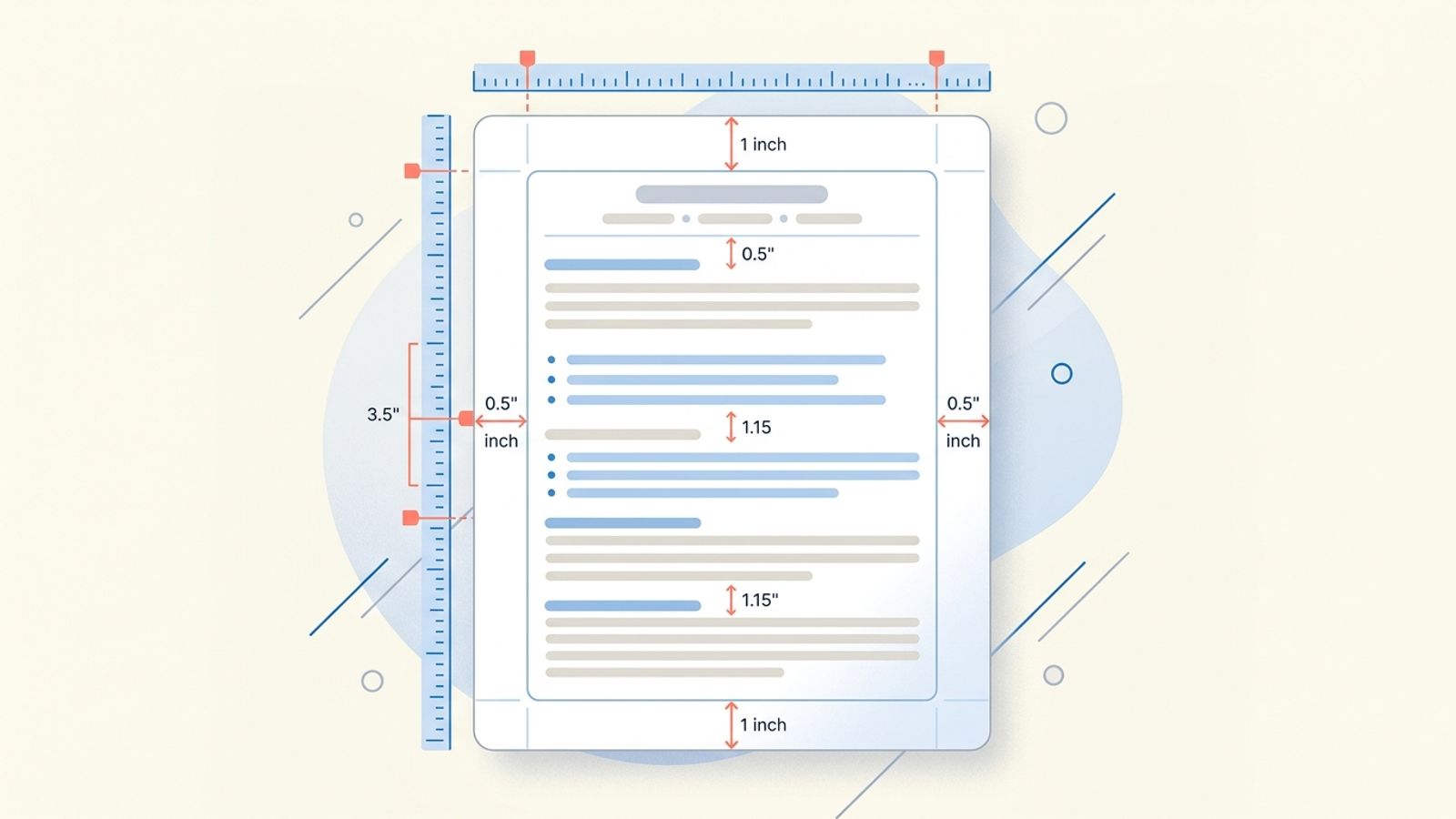
| All margins (top, bottom, left, right) | 1 inch | 0.5 - 1 inch | 0.3 inch |
| Header margin (top) | 0.5 - 0.7 inch | 0.3 - 1 inch | 0.25 inch |
1 inch on all sides is the default in every word processor for a reason: it gives the document clean edges and prevents text from feeling like it's falling off the page. Most resumes look best at 0.7-1 inch.
Dropping to 0.5 inch is fine if you need more space. Below 0.5, the text starts to feel crowded. At 0.3 inch, you've reached "I'm trying to cram 3 pages into 1" territory, and a recruiter will notice. So will a printer if the resume gets printed out, because most printers clip content below 0.25 inch margins.
Left and right margins should match. Top and bottom can differ slightly (a smaller top margin for a compact header is normal). Asymmetric left-right margins look like a formatting error.
Resume Spacing: Line Height and Section Gaps
| Setting | Recommended | What It Controls |
|---|---|---|
| Line spacing (within paragraphs/bullets) | 1.0 - 1.15 | How dense each section reads |
| Space between sections (Education, Experience, etc.) | 12 - 18pt gap | Visual separation between major blocks |
| Space between job entries | 6 - 10pt gap | Separation between roles within a section |
| Space between bullet points | 0 - 4pt gap | Tightness of achievement lists |
Single spacing (1.0) is the standard. 1.15 gives a touch more air and reads better on screens. Don't use 1.5 or double. That's for college essays, not professional documents. If your resume looks like it was written in MLA format, something went wrong.
Section gaps matter more than line spacing for readability. A hiring manager scanning your resume needs to instantly see where "Experience" ends and "Education" begins. If everything runs together with no visual break, the scan takes longer and the reader works harder. 12-18pt between sections creates that separation without wasting space.
Font Size (Related)
Margins and spacing only work in context with font size.
| Element | Recommended Size |
|---|---|
| Your name | 16-22pt |
| Section headings (Experience, Education, Skills) | 12-14pt |
| Body text and bullet points | 10-12pt |
| Contact info | 10-11pt |
10pt is the floor for body text. Below that, you're making the recruiter squint. Above 12pt, you're padding. Most resumes look best at 10.5-11pt body text.
For full font recommendations: best fonts for a resume.
When to Adjust (And When You've Gone Too Far)
The reason people mess with margins and spacing is usually the same: they can't fit their resume on one page.
“If you don't have 8-10 years of experience, you get ONE page for your resume.”
Before shrinking margins, try these first:
- Cut content. If a bullet point is weak or irrelevant to the roles you're targeting, remove it. Most resumes have 2-3 bullets that add nothing.
- Tighten wording. "Responsible for managing a team of 8 employees" becomes "Managed team of 8." Same information, half the words.
- Remove outdated experience. Anything over 10-15 years old can usually be condensed to one line or cut entirely.
- Drop "References available upon request." You're wasting a line.
If you've done all that and still can't fit on one page, then adjust margins to 0.5-0.7 inch and spacing to 1.0. That usually recovers enough room. If you're still over, the problem is content volume, not formatting. Either cut more or go to two pages if you have 10+ years of experience.
Guide on resume length and when two pages are acceptable: how long should a resume be.
Signs You've Gone Too Far
- Body text is below 10pt
- Margins are below 0.4 inches on any side
- There's no visible gap between sections
- You print it and the edges get cut off
- Someone unfamiliar with your resume says "this is dense" or "hard to read" within 5 seconds of looking at it
White space is not wasted space. It's what makes the content readable. A resume that uses every millimeter of the page communicates desperation, not thoroughness.
Before you leave
See how your resume stacks up
Paste any job description and get your match score in 30 seconds.
Try FreeFree month of Pro with code LAUNCH
FAQ
What margins does Google Docs use by default?
Should margins be different for a two-page resume?
Does ATS care about margins and spacing?
What about templates with sidebars or two-column layouts?
Skip the formatting headaches. Mirrai's Resume Builder uses ATS-compatible templates with correct margins, spacing, and fonts built in.